> For the complete documentation index, see [llms.txt](https://nobraintools.gitbook.io/maya-groomers-tool/llms.txt). Markdown versions of documentation pages are available by appending `.md` to page URLs; this page is available as [Markdown](https://nobraintools.gitbook.io/maya-groomers-tool/maya-tools/hair-strand-builders/display-toggles.md).
# Display Toggles
Display Toggles allows you to change the display of curves, or the strand geometries.
{% hint style="info" %}
* When toggling display settings, selected curves or strands will be modified. If none are selected, the changes apply to all curves/strands in the scene. Upon exiting the tool, all curves/strands revert to default settings.
{% endhint %}
Clicking on the icon shows toggle options:
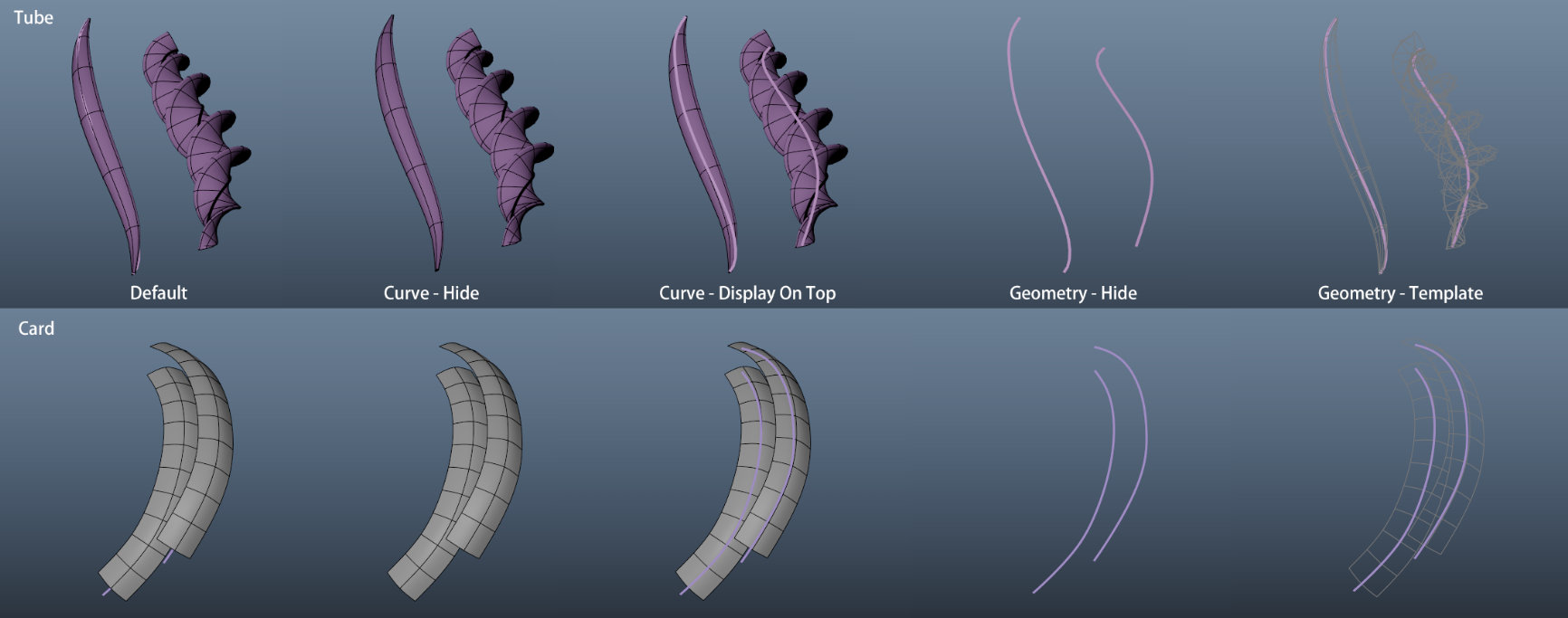
Strand curve and geometry toggle modes:
* **Curves - Hide:** Hide strand curves.
* **Curves -** Display On Top: Display strand curves on top of geometries.
* **Geometry - Hide** : Set strand geometries visibility off.
* **Geometry - Template** : Set strand geometries template on, this is good for if you like to trace hair strands to match imported models like AI generated model, or 3D scans.
* **Reset Visibility** : Reset curves and geometries visibility state back to default
***
* **Toggle Root Markers:** Attach/detach a light-weight sphere at the root of selected strands.
{% embed url="" %}
{% hint style="success" %}
You can ***Middle Mouse Click*** on the icon to reset everything back to default state.
{% endhint %}