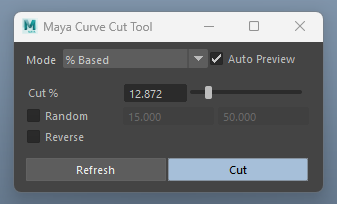
# Curve Cut Tool

<div align="left"><figure><img src="https://454332562-files.gitbook.io/~/files/v0/b/gitbook-x-prod.appspot.com/o/spaces%2FGyyK7o0fNRXvtva8vEkG%2Fuploads%2FGLYXV5WJIkU3LLQjTDct%2FxgtCurveCut_user.jpg?alt=media&#x26;token=4594805e-182b-4ed1-84b1-1e96ebe6eece" alt=""><figcaption></figcaption></figure></div>

## Overview

A tool to cut Maya curve(s) by input percentage, or cut between a defined ranges.

<figure><img src="https://454332562-files.gitbook.io/~/files/v0/b/gitbook-x-prod.appspot.com/o/spaces%2FGyyK7o0fNRXvtva8vEkG%2Fuploads%2FiaTVMpdopr10Drm2AdLz%2FCut_Showcase.gif?alt=media&#x26;token=3d46ec42-c2fc-4591-8380-e67f81355f69" alt=""><figcaption></figcaption></figure>

***

<div align="left"><figure><img src="https://454332562-files.gitbook.io/~/files/v0/b/gitbook-x-prod.appspot.com/o/spaces%2FGyyK7o0fNRXvtva8vEkG%2Fuploads%2FxUsOVNBComPpqFO11o1W%2Fimage.png?alt=media&#x26;token=ab055b5d-c451-4e9b-9a2e-05e7ba8b023f" alt=""><figcaption></figcaption></figure></div>

## Mode

* Choose between % Based, or Distance Based cutting method

## Auto Preview

* Toggles on/off the cut distance preview when selection changes. If it gets slow and heavy, consider turning this option off.

Auto Preview ON

New selections will automatically show the cut distance. This gives fast visual feedback of the point position on a curve that you are about to cut.

<figure><img src="https://454332562-files.gitbook.io/~/files/v0/b/gitbook-x-prod.appspot.com/o/spaces%2FGyyK7o0fNRXvtva8vEkG%2Fuploads%2F6e0vosVxmL1kYSvVsBgL%2FAutoPreview_On.gif?alt=media&#x26;token=17f7675e-8ad9-44a6-8c44-4087e537a58f" alt=""><figcaption></figcaption></figure>

Auto Preview Off

The selection preview is turned off

<figure><img src="https://454332562-files.gitbook.io/~/files/v0/b/gitbook-x-prod.appspot.com/o/spaces%2FGyyK7o0fNRXvtva8vEkG%2Fuploads%2FsVNomC8BBWaVFl2rIbNn%2FAutoPreview_Off.gif?alt=media&#x26;token=0897a5fe-69ac-4f4e-9d39-34b81730b91a" alt=""><figcaption></figcaption></figure>

When Auto Preview is On, you can simply click away from the selected curves to go back to object mode selection on the curves.

<figure><img src="https://454332562-files.gitbook.io/~/files/v0/b/gitbook-x-prod.appspot.com/o/spaces%2FGyyK7o0fNRXvtva8vEkG%2Fuploads%2FsUw2lPKImOjJdQvSADsM%2FAutoPreview_clickaway.gif?alt=media&#x26;token=f6e4bec7-3514-4df7-a96b-1f371ece39d1" alt=""><figcaption></figcaption></figure>

## **% to Cut:**

* All selected curves will be cut with the % entered in this field.

{% hint style="warning" %}
After a cut, if a curve is smaller than 0.001 Maya unit (in cm), the tool will delete the curve.
{% endhint %}

## **Random**

* Randomly cut all selected curves with the % range entered.
* Clicking on the '**Refresh**' button will re-generate the random seed.

<figure><img src="https://454332562-files.gitbook.io/~/files/v0/b/gitbook-x-prod.appspot.com/o/spaces%2FGyyK7o0fNRXvtva8vEkG%2Fuploads%2F6C45yvFQH5HfULaCCsVL%2FCut_Random_Refresh.gif?alt=media&#x26;token=4cb93b41-619f-4b2f-b831-9384944e1c48" alt=""><figcaption></figcaption></figure>

## Reverse

* Reverse the direction of the cut.