> For the complete documentation index, see [llms.txt](https://nobraintools.gitbook.io/maya-groomers-tool/llms.txt). Markdown versions of documentation pages are available by appending `.md` to page URLs; this page is available as [Markdown](https://nobraintools.gitbook.io/maya-groomers-tool/maya-tools/hair-strand-builders/display-layers.md).
# Display Layers
## Display Layers
Hair Strand Builder layers are Maya display layers. Upon creation, or loading of a new scene, the tool will automatically detect the layers. If for some reason the layers do not refresh, use the  at the top to refresh.
{% hint style="info" %}
If you like to get to the node for the layer, you can do so in the Outliner > Display > uncheck DAG object only
{% endhint %}
### Layer Bar
 **Layer visibility**
* Like Maya's display layers, turn on/off strands in that layer. When multiple layers are selected, all will be toggled.
\
 **Layer Lock**
* Like Maya's display layers, set template/lock on strands in that layer to keep them from being selected. When multiple layers are selected, all will be toggled
\
**Color Swatch:**
* Left-clicking on the color swatch will open up the regular color editor.
* Right-clicking on the color swatch will give you a list of colors for quick access.
* 
\
**Layer Name:**
* **LMB** on the layer name button itself will select all strand in this layer.
* **Ctrl + LMB** on the layer name will allow you to select multiple layers.
* **Shift + LMB** will allow you to batch select layers in their display layer orders. (Only for Maya 2023 +)
* **MMB** to isolate display highlighted layers.
* **RMB** will display more layer functions.
{% hint style="info" %}
Visit to learn more about [Shader and Layer Relations](/maya-groomers-tool/maya-tools/hair-strand-builders/shader-and-layer-relations.md)
{% endhint %}
***
## Layer Options
When right clicking on a layer, you will get some options
### **Create and Add To This Layer**
* With curve selected, create strand and add to the layer.
### **Move Selected To This Layer**
* With curve(s) or strand(s) selected, move to this layer.
### **Duplicate Layer**
* Duplicate selected layer(s)
{% hint style="warning" %}
The layers need to be "highlighted" to duplicate. Only highlighted layers will be duplicated.
{% endhint %}
### **Rename Layer**
* Rename the selected layer.
* When multiple layers are selected, the rename will be applied to all selected layers.
{% hint style="warning" %}
If by any chance you wish to undo the rename, please hit undo, and then click on the refresh button. 
{% endhint %}
### **Insert Above**
* Inserts selected layers above the right-clicked layer
### Insert Below
* Inserts selected layers below the right-clicked layer
### **Delete Layer**
* Delete selected layers.
{% hint style="warning" %}
The layers need to be "highlighted" to delete. Only highlighted layers will be deleted. If by any chance you wish to undo the delete, please hit undo, and then click on the refresh button. 
{% endhint %}
### Layer Management
The tool comes with Visibility, Lock and Up/Down buttons:\
 Toggle all layer **Visibility ON**\
 Toggle all layer **Visibility OFF**\
 Invert current layers **Visibility** states
\
 Toggle all layer **Lock ON**\
 Toggle all layer **Lock OFF**\
 Invert current layers **Lock** States
\
 Move selected Layer(s) Up\
 Move selected Layer(s) Down \
 Move selected Layer(s) to the top\
 Move selected Layer(s) to the bottom
***
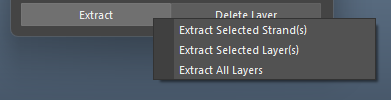
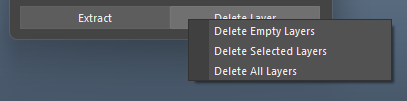
## **Extract/Delete Layer**
* **Extract Selected Strand(s)** - Makes a duplicate of strands from selected strands.
* **Extract Selected Layer(s)** - Makes a duplicate of strands from selected layers.
* **Extract All Layer(s)** - Makes a duplicate of strands from all layers.
* **Delete Empty Layers** - Delete all layers that do not have any members in them.
* **Delete Selected Layers** - Delete all selected layers (highlighted in the layer manager).
* **Remove All Layers** - Delete all layers and the setup.