> For the complete documentation index, see [llms.txt](https://nobraintools.gitbook.io/maya-groomers-tool/llms.txt). Markdown versions of documentation pages are available by appending `.md` to page URLs; this page is available as [Markdown](https://nobraintools.gitbook.io/maya-groomers-tool/start/main-menu.md).
# Main Menu
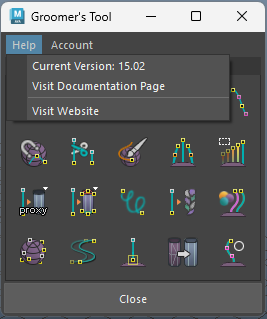
## **Help Menu**
**Current Version**
* Shows the current version of Groomer's Tool.
**Visit Documentation Page**
* Will take you to this document site
**Visit Website**
* will take you to [www.nobraintools.com](http://www.nobraintools.com)
***
## **Account Menu**
**Subscription**
* Indicates days left if your subscription is cancelled. (If it's not, it will show as 'Active')
**Validation Required**
* Indicates the days left before an online licensing re-check is due. You can safely ignore this is your machine is always 'online'.
**Re-Validate**
* allows you to swap a license (in case if you received a new key from subscription changes)
**Account Info**
* (Single User only) will display your detailed account information and seats bound with this license. Please keep your license to yourself. Your activated license.json file contains important personal information.
**Reset Seats**
* (Single User only) allows you to reset your bond devices, and ***bind*** the current machine. You can reset the bind every 14 days.
**Languages**
* Switch between English or Chinese.
**UI Setting**
* Switch between Auto Adjust + Label or Default tool icon view.
{% embed url="" %}