> For the complete documentation index, see [llms.txt](https://nobraintools.gitbook.io/maya-groomers-tool/llms.txt). Markdown versions of documentation pages are available by appending `.md` to page URLs; this page is available as [Markdown](https://nobraintools.gitbook.io/maya-groomers-tool/maya-tools/hair-strand-builders/strand-editor.md).
# Strand Editor
This is the main control for the corresponding tube/card geometry of selected strands.
{% hint style="danger" %}
#### **As of V15.07.01, the Hair Tube Builder Strand Editor has been updated. The documentation will be revised once the new workflow has stabilized and the changes have also been carried over to Hair Card Builder.**
{% endhint %}
***
### **UV Toggle** 
* This little red/green icon beside the Strand Name Bar controls UV tracking.
*  UV tracking on the selected strand is off. On a freshly created strand, clicking on this will auto-unwrap the UV.
*  UV tracking on the selected strand is on.
{% hint style="info" %}
Visit to learn more about [UVs](/maya-groomers-tool/maya-tools/hair-strand-builders/uvs.md)
{% endhint %}
## **Name Bar**
* Shows the name of current strand curve (default name will be something like:
* "xgt\_tube2\_group1\_masterCrv1". (For Tube)
* "xgt\_card2\_group1\_masterCrv1". (For Card)
* Clicking on this bar will select both the strand geometry and the curve.
* The name can not be edited per curve. However, you can choose to rename the layer names by right clicking on a layer, and select "Rename Layer".
### **Strand Presets**
* Presets allows you to save a strand's entire setting, so it can be reused in the current scene or a new scene.
{% hint style="info" %}
Visit to learn more about [Strand Presets](/maya-groomers-tool/maya-tools/hair-strand-builders/strand-presets.md)
{% endhint %}
***
## **Profile Curve**
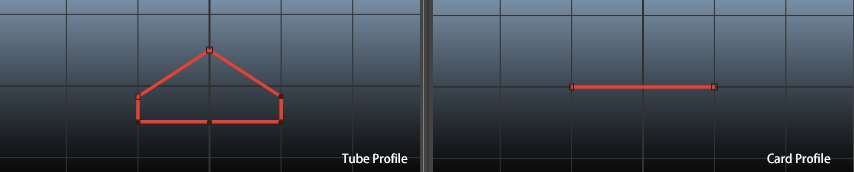
Profile curve window
* Modify profile curves in this window.
{% hint style="info" %}
Visit to learn more about [Profile Curves](/maya-groomers-tool/maya-tools/hair-strand-builders/profile-curves.md)
{% endhint %}
### **Shape Presets**
* Click the **Shape** button to view and select from various profile curve shapes. Choosing a shape will apply it to all profile curves root, tip and middle curves, overriding any existing shape.
{% hint style="info" %}
Visit to learn more about [Profile Shapes](/maya-groomers-tool/maya-tools/hair-strand-builders/profile-shapes.md)
{% endhint %}
### **Add/Remove Point**
* Allows you to quickly add or remove CVs on a profile curve.
{% hint style="info" %}
Visit to learn more about [Profile Shapes](/maya-groomers-tool/maya-tools/hair-strand-builders/profile-shapes.md#add-remove-point)
{% endhint %}
***
## **Attributes**
### **Shape**
* **Path Spans:** Changes the CV count on the path curve.
* **Subdivision:** Controls the length subdivision.
* **Scale:** Controls the size of the strand.
* **Scale X:** Controls the scaling in the X-axis of the strand.
* **Scale Z:** Controls the scaling in the Z-axis the strand.
* For Cards - Will only see the effect when your profile curves are 'none-flat'. Try it with any of the following default shape.
* **Set Length:**
* When **enabled**, the strand geometry will align all the way from root to tip of a curve.
* When **disabled**, you can manually input a length to apply to the strand.
* **Length:** When **Set Length** is enabled, you can adjust a custom length for the strand.
* **Rotation:** Rotates/orients the strand.
* **Twist:** Twists strands around the central curve axis. This setting needs to be coupled with the twist ramp.
* **Offset X:** Moves the strand in the X direction from the center axis.
* **Offset Z:** Moves the strand in the Z direction from the center axis.
* **Offset Rotation:** Spins around the tube strand using the center of the tube as the center axis.
### **Crease Controls: (Tube Only)**
* **Crease Geometry Checkbox**
* When this is on, the tool will automatically apply a crease operation to the tube using the CV index numbers in the Crease CVs box. To avoid slowing process, turn this checkbox off during strand adjustment, and only turn it back on when ready to apply creases.
* **Crease CVs:** CV index list for creasing.
* **Set:** Sets CV list from selected **root** curve CVs
* **Add**: Adds selected CVs to existing CV list.
* **Remove:** Removes selected CVs from existing CV list.
{% hint style="info" %}
Visit to learn more about [CV Labels/Crease/Tube UV (Tube Only)](/maya-groomers-tool/maya-tools/hair-strand-builders/cv-labels-crease-tube-uv-tube-only.md)
{% endhint %}
### **UV Controls**
* **UV: (Tube Only)**
* ****The UV field is for the tube's seam. It is based on the CV selected from the profile curves. To change the UV seam, select a vertex or a CV label, and click on **Set/Refresh UV**, to change the UV seam on tube strands.
* **Create/Refresh UV:**
* Clicking on this button will run an auto unwrap function.
* For Tubes - the result will be based on the current UV type and UV seam option that is set to.
* For Cards - the result will always be a strip layout.
* **UV Type**:
* **None** - default of all hair tube created will be set to None. The UV will be there, but it will most likely to be undesirable until you set the UV type to one of the following. (Tube Only)
* **Strip** - Automatically unwraps the tube strand so the UV is a long rectangle from top to bottom.
* **Grid** - Automatically unwraps the tube strand so the UV covers the entire 1 to 1 UV space.
* **Unfold** - Automatically unwraps the tube strand so the UV is more organic. This is done using Maya's Unfold function. (Tube Only)
* UV retaining : at the moment, UV retaining is only supported when in **Strip** or **Grid** mode.
{% hint style="info" %}
Visit to learn more about[UVs](/maya-groomers-tool/maya-tools/hair-strand-builders/uvs.md)
{% endhint %}
### **Aim Controls**
* **Aim Curve Offset:** When a strand is created, it automatically calculates the aim position so that the strand is always facing up. This can be a value of 0.5 or -0.5.
* **Aim Spans:** Changes the span count of aim curves.
* **Use Given Normal:** Default is set to off. For more complicated curves that twist, or curls around, twisting geometry can occur. In this case, you may want to use a custom normal to fix the issue.
* **Capture Normal:** Capture normal based on your viewport camera.
* **Toggle Aim Curve:** To further adjust the facing orientation along a strand, you can also display the aim curve and move the vertices.
* **Reset Aim Curve:** resets the aim curve back to its initial state.
{% hint style="info" %}
Visit to learn more about[Aim Controls](/maya-groomers-tool/maya-tools/hair-strand-builders/aim-controls.md)
{% endhint %}
### **Advanced Controls:**
* **Sampling Accuracy:** Sometimes if you are seeing the tip of strands 'twisting', try setting this parameter lower (0.20-ish) to fix the issue.